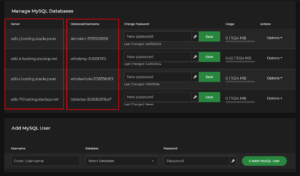

You can create a MySQL database from the Databases section of cPanel. The wizard creates a user for you automatically, so in most cases there is nothing else to set up.
Steps #
- Log in to cPanel and open MySQL Databases.
- Enter a name for the database and click Create Database.
- A user and password are generated automatically. Copy them somewhere safe before you leave the page, because the password is not shown again.
- Use these details in your application, for example in
wp-config.phpfor WordPress.
Things worth knowing #
- The database name and the username are the same by default.
- If you need an additional user, create one further down the same page and then add it to the database with the privileges you want.
- Database host: on most of our servers this is
localhost. If your database runs on a separate database server,localhostwill not work. The correct hostname is shown in the server details table on the same page, so always check there rather than assuming.