

An SSL certificate encrypts the connection between your visitors and the server, and gives you the padlock in the browser address bar. Browsers mark sites without one as Not secure.
Our budget cloud hosting includes a free wildcard SSL certificate, which covers your domain and its subdomains. Before you activate it, make sure the domain is already pointing at our nameservers — the certificate cannot be issued otherwise.
Steps #
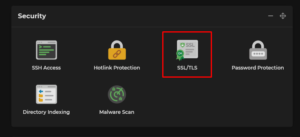
1. Log in to cPanel and, under Security, click the SSL/TLS icon.
2. Find your domain in the list and click Activate Free SSL next to it. The certificate is applied to that domain.
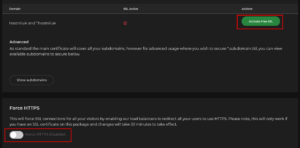
3. To send every visitor to the secure version automatically, use the Enable option for HTTPS redirection at the bottom of the same page.
How long it takes #
Allow up to 30 minutes after activation before the padlock appears reliably. The delay is on our side: the certificate has to be pushed out to the load balancers that sit in front of the servers. Refreshing the page repeatedly will not speed it up.
If it does not work #
- Check the domain is pointing at us before anything else. Nothing can be issued until it is.
- Turn the Cloudflare proxy off during activation if you use it. With the orange cloud enabled, the validation request never reaches our server.
- Padlock still broken after 30 minutes? The page is probably loading an image or script over HTTP. See Force redirect to HTTPS for how to fix mixed content.
- On a different plan? If your package uses AutoSSL rather than this button, see Install SSL certificates.