

Account credit is a prepaid balance held on your HostNil account. You can put money in whenever it suits you and use it later to pay invoices, including automatic renewals. It is useful if you would rather top up once than make a payment every time something is due.
Adding credit #
1. Log in to the client area.
2. In the Available Credit box on the home page, click Add Funds.

3. Choose the amount you want to add and the payment method.
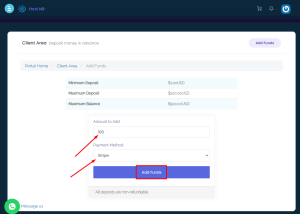
4. Click Add Funds and complete the payment. The balance appears on your client area home page once the payment clears.

Using the credit #
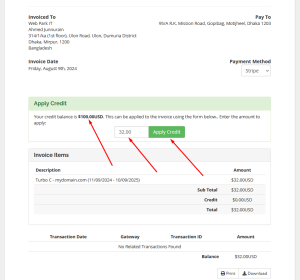
Open any unpaid invoice and apply the credit balance to it. If the balance covers the full amount, the invoice is settled immediately with nothing further to pay.
Worth knowing #
- Credit is applied to renewals automatically where the balance is enough, so a service is far less likely to lapse because a payment was missed.
- If the balance only covers part of an invoice, the remainder still has to be paid by your usual method.
- Credit is held against your account and is not withdrawn back to your card or wallet. Add what you expect to spend rather than a large amount in advance.
- Account credit is separate from any refund. See our money-back guarantee for how refunds work.