

A subdomain is a section of a domain you already own, such as blog.example.com. An addon domain is a completely separate domain hosted in the same cPanel account, such as anothersite.com. Both are created in the Domains area of cPanel.
Creating a subdomain #
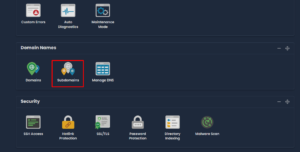
1. Log in to cPanel and open Subdomains in the Domains section.
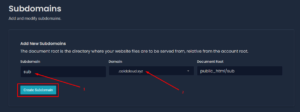
2. Type the subdomain name, choose the parent domain, and click Create Subdomain. cPanel fills in a document root for you, which you can change if you want the files somewhere else.
Adding a domain #
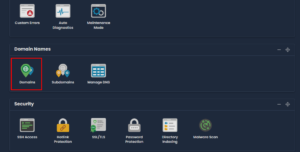
1. Log in to cPanel and open Domains.
2. Enter the domain and click Add Domain.
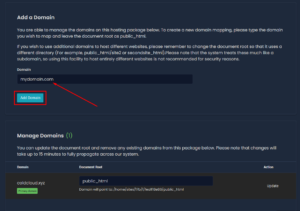
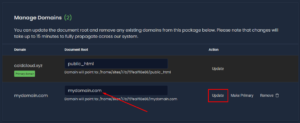
3. Adjust the document root if you want the files in a particular folder.
Understanding the document root #
The document root is the folder on the server that the domain loads its files from. Your main domain uses public_html. Each additional domain or subdomain should have its own folder, so the sites do not overwrite each other:
public_html— your main domainpublic_html/anothersite.com— an addon domainpublic_html/blog— a subdomain
cPanel suggests a sensible folder automatically. Change it only if you know why you are doing so. Pointing a second domain at public_html makes it show your main website instead of its own, which is a common and confusing mistake.
Before it will work #
- An addon domain must point at our nameservers before it will load. Adding it in cPanel does not change where the domain points.
- A subdomain works immediately, since it inherits the DNS of the parent domain.
- SSL is issued automatically for both, though it can take a short while. See installing SSL certificates.
- Check your plan allows the number of domains you are adding. If it does not, see switching to another plan.